WooCommerce Hosting
Fast & Reliable WooCommerce Hosting
Build, manage, and grow your online store with WooCommerce hosting designed for speed, security, and dependable performance. CloudCareHost gives your store the reliable infrastructure and support it needs to deliver a smooth shopping experience.

WooCommerce Hosting Plans
Choose a WooCommerce hosting plan with the right performance, resources, and flexibility to support your store at every stage of growth.
WooCommerce Pro
Billed monthly
- 2 Website
- 3 Email Accounts
- 2 GB RAM
- 40 GB Storage & 100 GB Bandwidth
- 2 MySQL Databases
- 2,00,000 Inode Limit
- Terminal Access
- Daily Backups / Jetbackup
- 99.9% Uptime Guarantee
- 30-Day Money-Back Guarantee
WooCommerce Business
Billed monthly
- 10 Websites
- 5 Email Accounts
- 4 GB RAM
- 100 GB Storage & 500 GB Bandwidth
- 15 MySQL Databases
- 4,00,000 Inode Limit
- Terminal Access
- Daily Backups / Jetbackup
- 99.9% Uptime Guarantee
- 30-Day Money-Back Guarantee
WooCommerce Business Cloud
Billed monthly
- 50 Websites
- 20 Email Accounts
- 8 GB RAM
- 150 GB Storage & 1 TB Bandwidth
- 125 MySQL Databases
- 6,00,000 Inodes Limit
- Terminal Access
- Daily Backups / Jetbackup
- 99.9% Uptime Guarantee
- 30-Day Money-Back Guarantee
The foundation
What Is WooCommerce Hosting?
WooCommerce hosting is web hosting optimized to run WooCommerce stores with the performance, security, resources, and scalability needed for online shopping. Unlike basic hosting, it is designed to support the dynamic workloads created by products, carts, customer accounts, orders, payments, and checkout processes.
For a WooCommerce store, the hosting environment matters because your website is doing more than serving pages. It is constantly working with WordPress, WooCommerce, databases, PHP processes, plugins, and customer activity.
WordPress Compatibility
WooCommerce runs on WordPress, so the hosting environment needs to support WordPress reliably. A compatible setup helps the store, themes, plugins, and WordPress core work together without unnecessary server-side limitations.
WooCommerce Compatibility
WooCommerce adds ecommerce functionality such as product catalogs, shopping carts, checkout, orders, and inventory management.
Database Requirements
Every WooCommerce store relies heavily on its database to manage products, orders, customers, settings, and other store information. Reliable database performance is therefore essential for keeping product pages, account areas, search, cart, and checkout responsive.
PHP Resources
WooCommerce and many WordPress plugins depend on PHP to process requests and run store functionality. Adequate CPU, RAM, PHP workers, and support for modern PHP versions can help your store handle multiple requests efficiently, particularly during busy periods.
Performance
A fast WooCommerce store creates less friction between browsing and buying. NVMe SSD storage, LiteSpeed, caching, CDN delivery, and a well-configured server can reduce loading times and help pages respond smoothly as visitors browse products or move through checkout.
Security
An online store handles valuable business and customer information, making security a core hosting requirement. Features such as SSL, server-level protection, malware detection, firewalls, secure backups, and regular monitoring can add important layers of protection around your WooCommerce website.
Scalability
As your store grows, so do its products, visitors, orders, and resource requirements. Good WooCommerce hosting should make it possible to increase resources as needed, allowing the hosting environment to keep pace with growing traffic and store activity without forcing an unnecessary migration to a completely different platform.
Why Does Your WooCommerce Store Need Specialized Hosting?
WooCommerce stores handle more than regular websites. They process products, customer accounts, orders, inventory, carts, payments, and plugins, making reliable hosting essential for smooth store operations.
WooCommerce Stores Are Database-Driven
WooCommerce constantly reads and updates database information, including products, customers, orders, inventory, carts, and checkout details. A well-optimized database environment helps these requests process efficiently.
Dynamic Pages Need More Server Resources
Pages such as product searches, customer accounts, carts, and checkout require server-side processing. Sufficient CPU, RAM, PHP resources, and database capacity help keep these functions responsive.
Traffic Spikes Can Affect Store Performance
Sales, promotions, and product launches can bring sudden traffic increases. Hosting with adequate resources, caching, CDN support, and scalability helps your store handle busy periods without unnecessary slowdowns.
Slow Checkout Can Affect Revenue
Checkout is where browsing turns into a purchase. Slow page responses or delays during cart and checkout can frustrate customers and contribute to abandoned orders. Reliable hosting helps keep the buying process quick and consistent.
Why Choose CloudCareHost for WooCommerce Hosting?
CloudCareHost combines WooCommerce-focused infrastructure, modern performance technology, security, and responsive support to give online stores a dependable hosting foundation. From launching a new store to handling growing traffic, the environment is built to support the demands of ecommerce.
WooCommerce-Optimized Hosting Environment
A hosting setup designed to support WordPress, WooCommerce, plugins, products, orders, and dynamic store functionality.
NVMe SSD Storage
Faster storage helps your store access files and data more efficiently, supporting quicker page responses.
LiteSpeed Web Server & Caching
LiteSpeed and caching technology help deliver WooCommerce pages faster while reducing unnecessary server workload.
Cloudflare CDN
Delivers static website content from locations closer to visitors, helping improve loading times for customers in different regions.
Free SSL & Website Security
Protect customer connections and strengthen your store with SSL and essential security protection.
Free WooCommerce Migration
Move an existing WooCommerce store to CloudCareHost without handling the migration process alone.
24/7 Human Technical Support
Get assistance from a technical support team whenever hosting issues or questions arise.
Scalable Resources
Upgrade your hosting resources as your product catalog, traffic, and order volume increase.
Built for Fast WooCommerce Store Performance
Store speed can influence how customers browse products, interact with your website, and complete purchases. CloudCareHost uses a performance-focused hosting stack to help WooCommerce stores load efficiently and remain responsive under everyday workloads.
- NVMe SSD StorageProvides faster data access than traditional storage, helping improve overall server responsiveness.
- LiteSpeed Web ServerBuilt to handle web requests efficiently and deliver dynamic content with lower processing overhead.
- Advanced CachingStores frequently requested content to reduce repeated processing and improve page delivery.
- Optimized PHP & PHP WorkersHelps WooCommerce process dynamic requests efficiently, particularly when multiple visitors are active.
- Cloudflare CDNDistributes static content across a global network to reduce the distance between your store and its visitors.
- Optimized Database PerformanceHelps WooCommerce efficiently manage products, customers, orders, inventory, and other store data.
- HTTP/2 & Modern Web TechnologiesSupports efficient connections and modern methods of delivering website resources for a smoother browsing experience.
Secure Hosting for Your WooCommerce Store
Protect your store, customer data, and business operations with multiple layers of security built into your CloudCareHost hosting environment.
- Free SSL CertificateEncrypt customer data and create a secure connection across your WooCommerce store.
- Web Application FirewallFilter suspicious web traffic and help block malicious requests before they reach your website.
- Malware ProtectionDetect and protect your store against malicious files and harmful website activity.
- DDoS ProtectionHelp keep your store accessible by mitigating traffic attacks designed to overwhelm your server.
- Secure Server InfrastructureRun your WooCommerce store on a hosting environment built with security and reliability in mind.
- Automated BackupsKeep regular copies of your website data so your store can be restored when needed.
- Account & Website IsolationHelp contain security issues by keeping websites and hosting accounts separated from one another.
Everything You Need to Manage Your WooCommerce Store
CloudCareHost gives you the hosting foundation to run your WooCommerce store while WooCommerce provides the tools to manage your day-to-day ecommerce operations.
WordPress & WooCommerce
Run WordPress and WooCommerce together on a hosting environment built for online stores.
Product Management
Add products, organize categories, manage prices, and keep your inventory up to date.
Payment Gateways
Connect supported payment methods and give customers a convenient way to complete purchases.
Shipping & Tax
Configure shipping methods, delivery options, and tax settings based on your store's requirements.
Themes & Plugins
Customize your store and add new functionality with WooCommerce-compatible themes and plugins.
Customer Accounts
Let customers manage their profiles, addresses, orders, and account information from one place.
Built for the WooCommerce Ecosystem
WooCommerce works with a wide range of tools that help store owners build, sell, optimize, and manage their businesses. CloudCareHost provides a hosting environment that supports the core WordPress and WooCommerce stack along with the themes, plugins, and services commonly used to extend an online store.
Build the foundation of your store with WordPress and WooCommerce.
Create and customize storefronts using compatible themes and page-building tools.
Add payment methods and shipping functionality suited to your customers and products.
Optimize product pages, monitor traffic, and understand how visitors interact with your store.
Improve website performance with compatible caching and optimization tools.
Add additional website-level security controls alongside your hosting protection.
WooCommerce Hosting for Every Type of Online Store
Whether you're launching your first product or managing an established ecommerce business, CloudCareHost provides WooCommerce hosting designed to support different store sizes and business models.
Small Business Stores
Launch a professional online store without taking on unnecessary hosting complexity.
Growing Ecommerce Stores
Support increasing products, visitors, orders, and resource requirements as your business expands.
High-Traffic WooCommerce Stores
Get a hosting environment designed to handle higher visitor volumes and demanding store activity.
Product Catalog Websites
Manage large product collections with hosting suited to database-driven WooCommerce websites.
Digital Product Stores
Sell downloads, memberships, courses, software, and other digital products through WooCommerce.
Subscription-Based Stores
Support recurring products and subscription services with a reliable hosting foundation.
B2B WooCommerce Stores
Build online ordering experiences for business customers, wholesale buyers, and trade-focused ecommerce operations.
Free Website Migration
Our migration specialists handle the transfer process carefully to minimize downtime and reduce unnecessary interruptions for websites, databases, or an entire server environment.

WooCommerce Hosting vs Regular Web Hosting
Regular web hosting can be suitable for blogs, portfolios, and simple business websites. A WooCommerce store has different requirements because it handles products, customer accounts, orders, carts, checkout activity, and database-driven requests.
| Feature | WooCommerce Hosting | Regular Web Hosting |
|---|---|---|
| WooCommerce Optimization | Environment configured for WooCommerce workloads | General-purpose hosting |
| eCommerce Performance | Built to support dynamic store activity | Primarily designed for standard websites |
| Dynamic Database Workloads | Better suited to frequent product, order, and customer data requests | Suitable for lighter database workloads |
| Caching | Performance caching suited to ecommerce environments | Standard website caching |
| eCommerce Security | Security considerations for online stores and customer data | General website security |
| Scalability | Resources can be increased as store demands grow | Depends on the hosting plan and infrastructure |
| Migration Assistance | Dedicated WooCommerce migration support | May require manual migration |
| Store Support | Support focused on hosting and WooCommerce-related requirements | General hosting support |
The key difference is the workload. A regular website mainly delivers content, while a WooCommerce store needs to process ongoing customer and transaction activity. Choosing hosting that is prepared for those demands can give your store a more dependable foundation for growth.
WooCommerce Hosting vs VPS Hosting: Which Is Right for You?
The right hosting depends on your store's size, traffic, technical requirements, and how much server management you want to handle. WooCommerce hosting is usually the simpler choice for store owners, while VPS hosting offers greater control and dedicated resources for more demanding workloads.
WooCommerce Hosting
Best for
- Small businesses launching an online store
- New WooCommerce websites
- Growing ecommerce stores
- Store owners who prefer a managed hosting environment
- Businesses that want to focus on selling rather than server administration
WooCommerce hosting is a practical starting point when the priority is getting a store online with the right hosting environment without taking on complex server management.
VPS Hosting
Best for
- Larger or high-traffic WooCommerce stores
- Businesses with specific server configurations
- Developers and technical teams
- Stores requiring greater control over the server environment
- Websites with higher CPU, RAM, or processing requirements
A VPS gives you more control over the server environment, making it useful when your store has outgrown standard hosting or requires custom configurations.
Dedicated Server
Best for
- Very high-traffic ecommerce stores
- Large and resource-intensive databases
- Enterprise WooCommerce workloads
- Businesses requiring maximum dedicated server resources
Dedicated hosting provides an entire physical server for your business, making it suitable for stores with substantial traffic and consistently demanding workloads.
For most small and growing stores, specialized WooCommerce hosting offers a simpler starting point. As traffic, orders, and resource requirements increase, moving to VPS or dedicated hosting can provide additional capacity and control.
How WooCommerce Hosting Affects SEO and Store Performance
WooCommerce hosting can influence SEO indirectly by affecting server response times, page performance, website availability, and the overall experience visitors have on your store. Hosting is not a standalone ranking shortcut, but a slow or unreliable server can make it harder to deliver a fast, accessible website.
A strong hosting environment gives your website a better technical foundation. From there, factors such as website code, images, themes, plugins, caching, and content also determine the final page experience.
Time to First Byte measures how quickly a visitor's browser receives the first byte of data from your server. Server resources, application processing, database performance, and network conditions can all influence TTFB. For WooCommerce stores, efficient server processing can help reduce delays before a page begins loading.
Largest Contentful Paint measures how quickly the main visible content on a page loads. A capable hosting environment can help deliver server responses and website resources efficiently, while image optimization, caching, and frontend performance also play important roles.
Interaction to Next Paint measures how responsive a website feels when visitors interact with it. WooCommerce stores often include interactive elements such as product filters, carts, account areas, and checkout fields, so efficient processing can contribute to a more responsive experience.
Cumulative Layout Shift measures unexpected movement of page content while a page loads. Hosting alone does not determine CLS, but reliable resource delivery combined with properly sized images, fonts, and page elements can help create a more stable layout.
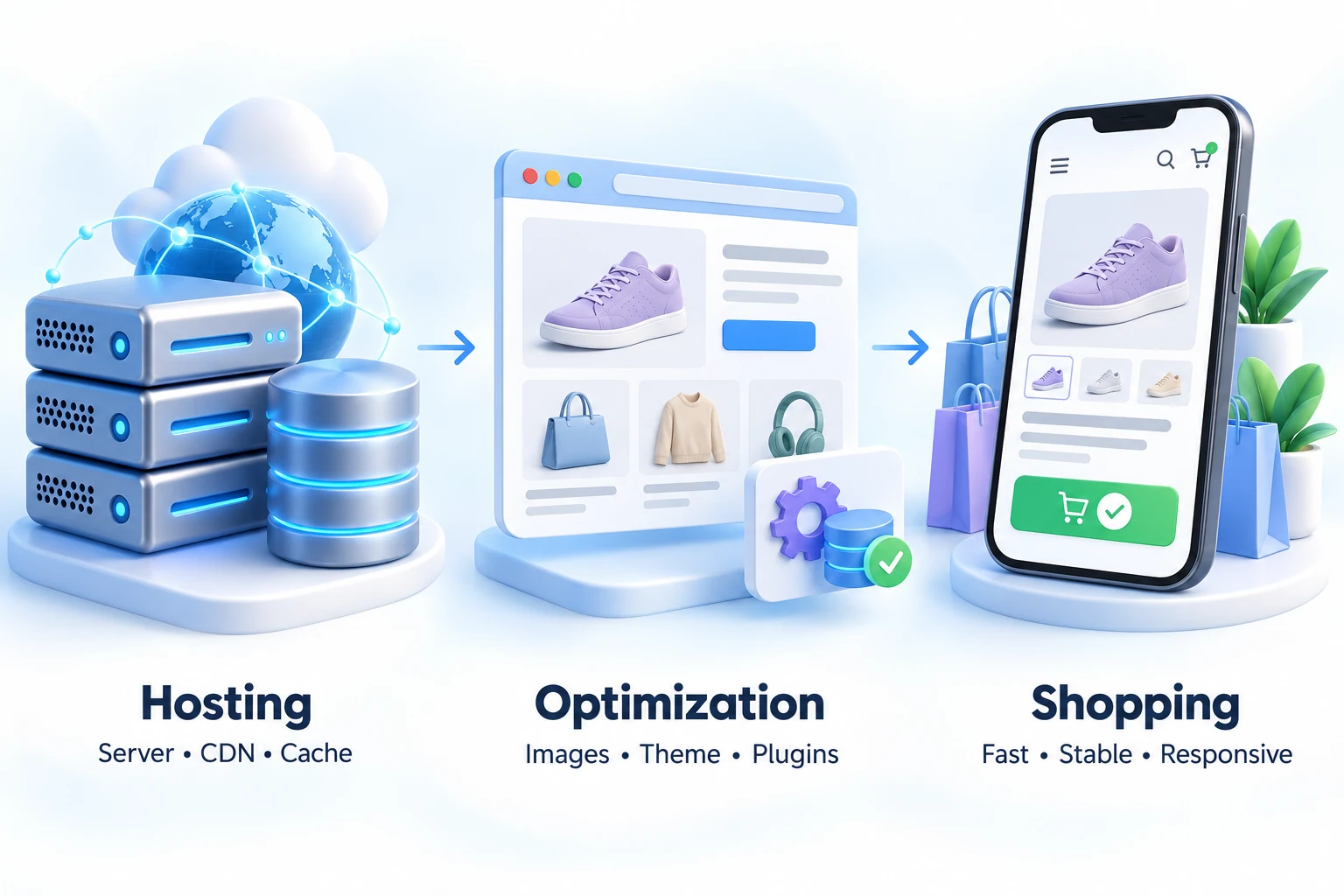
Hosting foundation → shopping experience
Mobile Performance
Many customers browse and shop from smartphones, making mobile performance particularly important for ecommerce. A fast server, CDN, caching, optimized images, and a responsive website can work together to create a smoother mobile shopping experience.
Website Availability
An online store needs to be accessible when customers are ready to shop. Reliable infrastructure, monitoring, security protection, and appropriate resources can help reduce unexpected downtime and keep your WooCommerce store available.
CloudCareHost provides the hosting foundation your WooCommerce store needs to deliver a fast, stable, and dependable shopping experience, while your website's theme, plugins, content, and optimization determine how that foundation performs in practice.
Get WooCommerce HostingHow to Choose the Best WooCommerce Hosting
Choosing WooCommerce hosting is about more than finding the cheapest plan. Your hosting should have enough resources for your store today, while giving you room to handle more products, visitors, and orders tomorrow. Use this checklist before choosing a provider.
Check Server Resources
Look at the CPU, RAM, storage, and PHP resources included with the plan. A WooCommerce store needs enough capacity to handle dynamic requests, database activity, plugins, and customer traffic.
Choose Fast Storage
NVMe SSD storage can provide faster data access than traditional storage. This can help your store respond more quickly when loading website files and retrieving data.
Check Caching
Caching reduces the amount of work your server needs to perform for repeated requests. Make sure the hosting environment supports caching that works properly with WooCommerce's dynamic pages.
Check CDN Availability
A CDN can deliver static website resources from servers closer to your visitors. This is particularly useful when customers access your store from different locations.
Look at Security
Check for essential protection such as SSL, firewalls, malware protection, DDoS protection, and regular backups. Ecommerce stores handle valuable customer and business information, so security should never be an afterthought.
Check Scalability
Your hosting should be able to grow with your store. Look for flexible resources or upgrade options that can accommodate increasing traffic, products, and order volumes.
Check Migration Support
Moving an existing WooCommerce store can involve transferring files, databases, configurations, and other store data. Free migration assistance can make the transition considerably easier.
Evaluate Technical Support
When your store is online, hosting problems can quickly become business problems. Look for responsive 24/7 technical support that can help when something goes wrong.
Check Uptime
Reliable availability matters for ecommerce. Review the provider's uptime commitment and understand what infrastructure and monitoring are used to keep websites accessible.
Compare Total Value
Don't compare hosting plans on price alone. Consider the resources, performance features, security, backups, migration assistance, support, and scalability included in the package. The best WooCommerce hosting is the one that provides the right overall value for your store's needs.
Global Data Centers for Better Performance
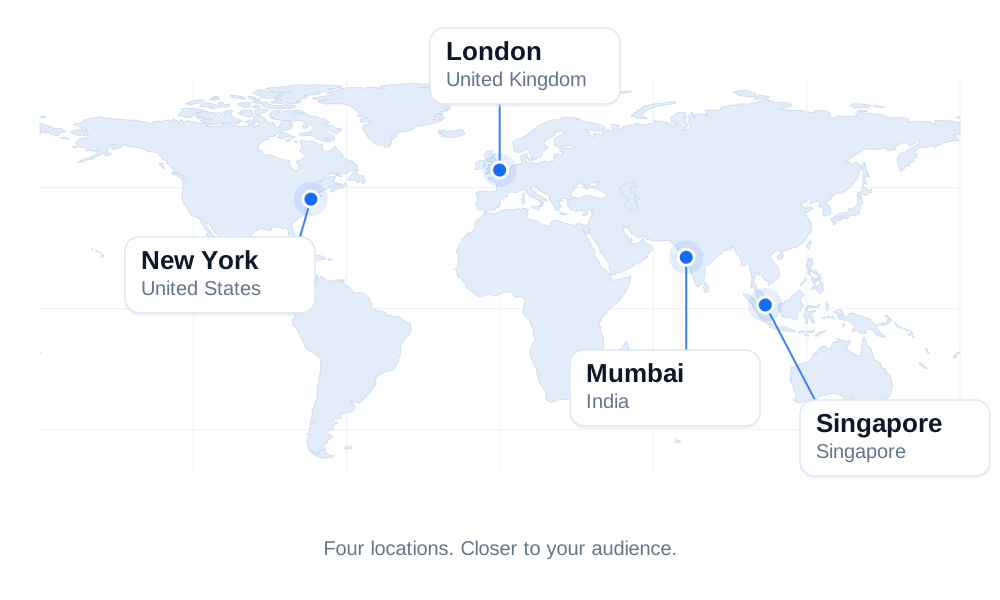
Deploy your websites and applications closer to your audience with strategically located data centers in New York (USA), London (UK), Singapore, and Mumbai (India). Built to deliver reliable connectivity and low latency.
Contact Our Team
Your next step starts with a conversation. From choosing a hosting plan to moving your website or planning a custom setup, we’re here to help.

What Our Customers Say
"I moved two business websites from shared hosting to a VPS, and the difference was obvious within the first few days. Page loading times became more consistent, and the migration process was much smoother than I expected."
Rahul Sharma
Pune, India · VPS"I've been using the shared hosting plan for my portfolio website for more than a year. The setup process was simple, and whenever I needed help, the support team responded quickly."
Emily Carter
Manchester, UK · Shared"Managing our WordPress store became much easier after switching to managed hosting. Updates, backups, and security tasks are handled for us, which gives us more time to focus on the business."
Jason Miller
Austin, USA · WP Hosting"Our applications required a dedicated environment with more resources and complete control over the server. Everything was configured exactly as requested, and the transition was completed without any major issues."
Lucas Schneider
Berlin, Germany · DedicatedMore Than Hosting for Your WooCommerce Store
Your hosting should make running an online store easier, not add another technical burden. CloudCareHost brings together the performance, security, reliability, and support WooCommerce stores need, with flexible resources that can keep pace as the business grows.
Performance
Get a performance-focused hosting environment with NVMe SSD storage, LiteSpeed, caching, and Cloudflare CDN to help your store load quickly and respond smoothly.
Security
Protect your store with SSL, web application firewall protection, malware protection, DDoS protection, and automated backups.
Reliability
Keep your store available for customers with dependable infrastructure designed to support consistent website performance.
Migration
Moving from another host? CloudCareHost provides free migration assistance to help transfer your existing WooCommerce store with less hassle.
Scalability
As your traffic, products, and orders increase, you can upgrade your hosting resources to match your store's changing requirements.
Support
Get 24/7 human technical support when you need help with your hosting environment, migration, or technical issues.
Launch Your WooCommerce Store in 3 Simple Steps
Getting started doesn't need to be complicated. Choose your hosting, set up your store, and get ready to sell.
Step 1
Choose Your Plan
Pick the CloudCareHost WooCommerce hosting plan that fits your store's current needs and expected growth.
Step 2
Install or Migrate WooCommerce
Start a new WooCommerce store or move your existing website to CloudCareHost with help from our migration team.
Step 3
Add Products & Start Selling
Customize your storefront, add your products, configure payments and shipping, and launch your store for customers.